
Key Takeaways:
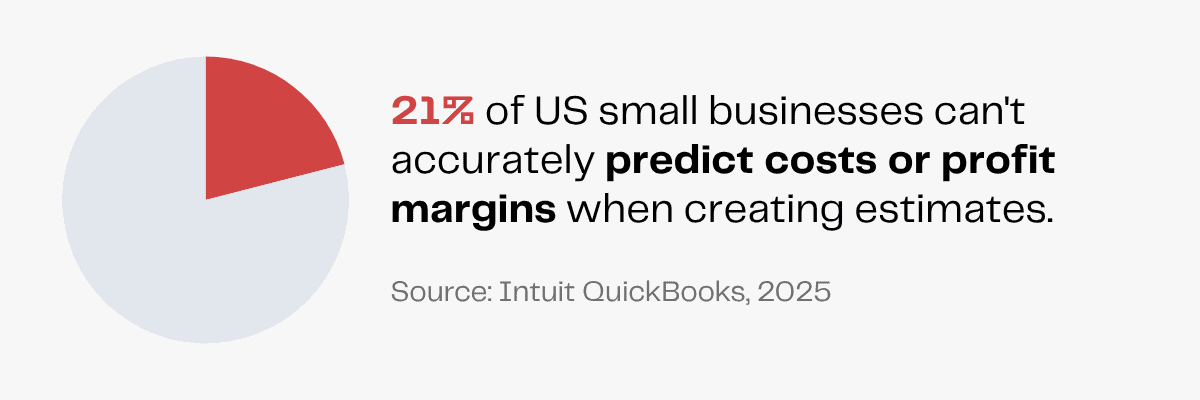
21% of small businesses in the US can’t accurately predict costs or profit margins when creating estimates.
Small businesses with outstanding invoices are owed more than $17,000 each on average.
69% of small businesses in the US are confident they are paying taxes correctly with an accountant/bookkeeper.
Losing sleep over that one big invoice that went missing?
How much is to be paid? By when? What was the order quantity? No one but that invoice knows.
In growing businesses, keeping track of every single transaction is borderline impossible. Missing records can reduce financial visibility and mistakes in invoices can cost you thousands of dollars—proving that most businesses have outgrown manual bookkeeping.
Pairing QuickBooks software and a virtual assistant is the smarter solution to eliminate bookkeeping errors.
While a virtual assistant can handle many tasks, a QuickBooks virtual assistant will specifically use the tool to support the financial tasks of your business.
Find out everything you can delegate to your QuickBooks virtual assistant, the benefits of hiring them and how you can find the best VA on the market!
What Is QuickBooks?
Sean Manning, the CEO and Founder of Payroll Vault, says,
As new tools are made available, it falls to the professionals to familiarize themselves with the proper places for these tools in their industries.
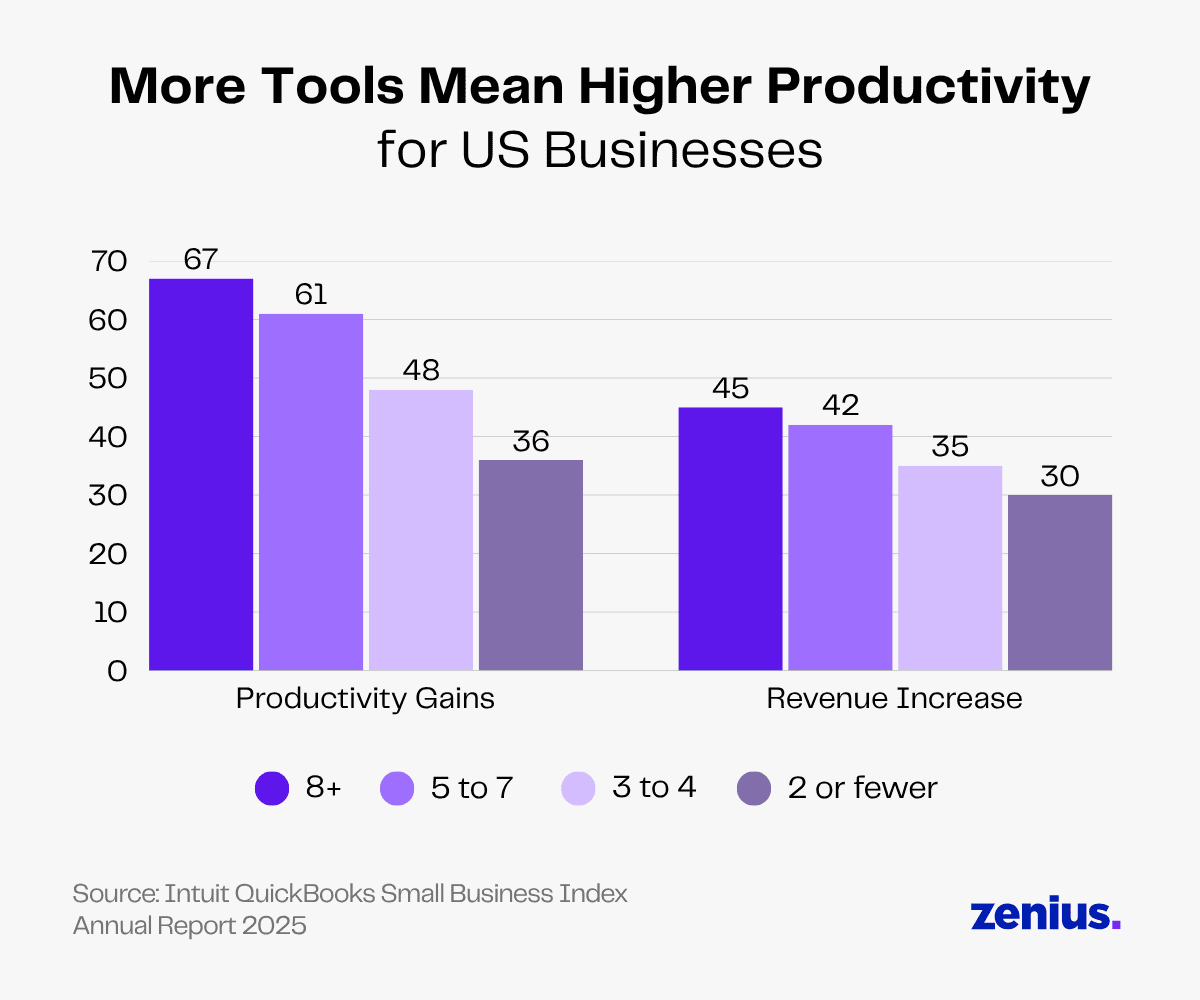
In fact, 67% of businesses saw productivity gains and 45% saw revenue increase after using 8 or more digital tools.
Instead of the old-fashioned pen and paper, it’s beneficial for businesses to use QuickBooks software to save time and ensure accuracy in bookkeeping.
QuickBooks is a finance management platform developed by Intuit that helps businesses track income, handle expenses, manage bills and perform other financial tasks.
Some key business processes it facilitates include sending invoice reminders, payroll management and bill tracking.
Its simple interface can be used to create different types of financial reports that provide an overall picture of how your business is doing, with the option of viewing various aspects in detail.
It also provides automation and industry-specific customization options. You can also integrate QuickBooks with other apps you have already been using, saving you from uploading the data from the previous database.
What Is a QuickBooks Virtual Assistant?
A bookkeeping virtual assistant (VA) is a remote professional who manages a business’s financial tasks.
A QuickBooks VA specifically leverages the QuickBooks tool for its excellent features like invoice creation, expense tracking and reporting.
You should consider outsourcing QuickBooks tasks to a VA if:
- You want to optimize your costs.
- You want better access to talent.
- You want to improve work quality and productivity.
- You want better alignment with business strategy and operating model shifts.
Read more: Everything You Need To Know About the Virtual Assistant Industry
What Are the Benefits of Hiring a Virtual Assistant for QuickBooks?
The success of a business lies in how well its finances are managed.
Virtual assistants understand industry-specific operations and can use the advanced features of QuickBooks to get multi-currency support, custom reports and payroll integration.
There are many pros of hiring a VA and the biggest one is that you save on costs without compromising the quality of work. They look over your accounts so you avoid penalties and errors before they become costly.
Here are the other benefits of hiring a QuickBooks virtual assistant.
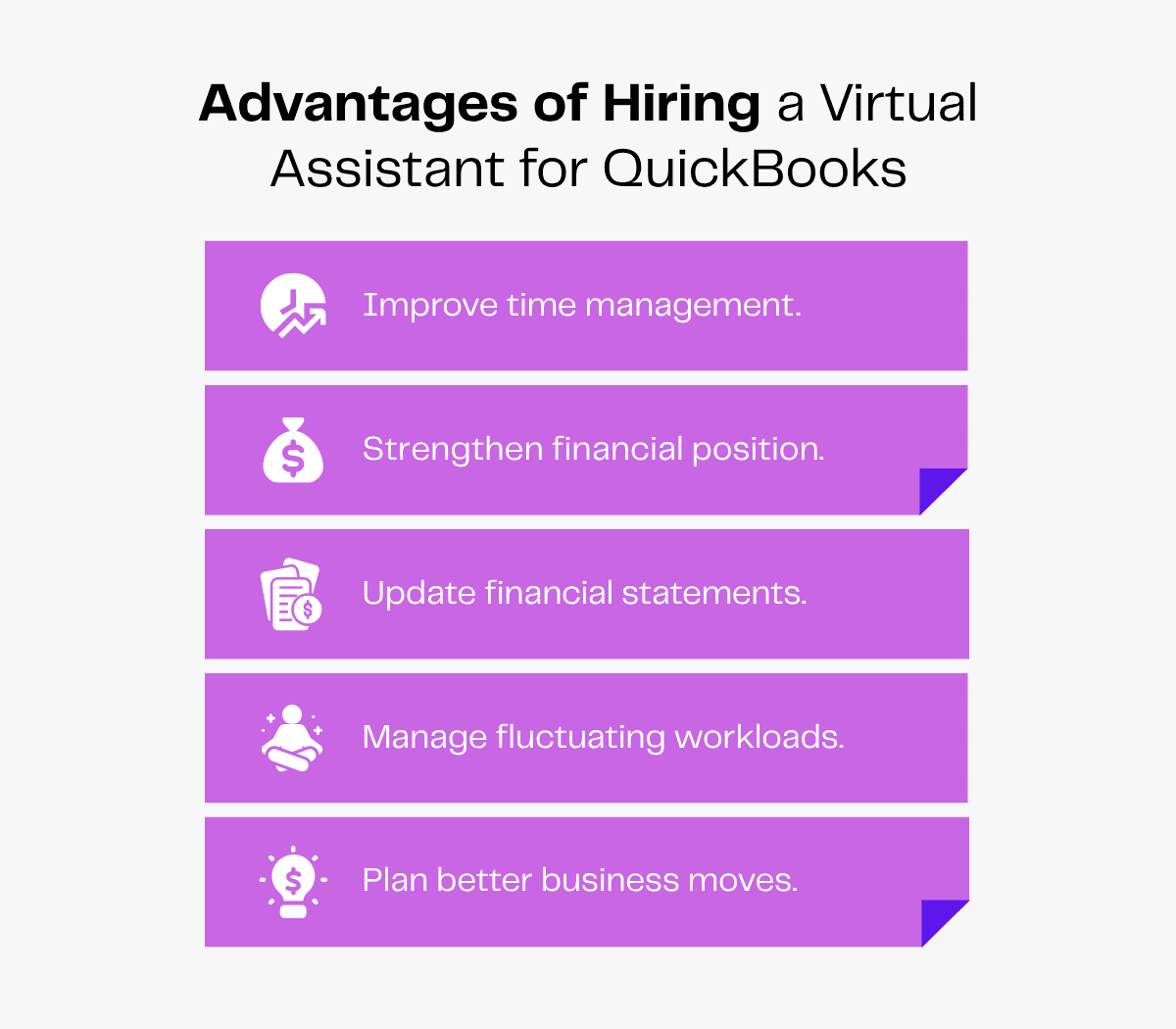
1. Improve Time Management
Imagine you have 200 transactions in a month. On average, you’d take around 3–5 minutes to record per transaction, costing you up to 1000 minutes on bookkeeping alone!
Virtual assistants help you perform bookkeeping so you get financial insights faster.
They can set up an account on QuickBooks to automate several bookkeeping tasks and remove the time-consuming ones from your plate.
Whether it’s invoice creation, bank reconciliation or expense categorization, they’ll streamline the routine tasks.
Instead of wasting hours doing everything yourself, you can focus on decision-making and business growth.
2. Strengthen Financial Position
Julie DeLong, cofounder and COO of Backyard Bookkeeper, says,
Good bookkeeping is necessary to produce accurate, detailed financial reports. Skilled bookkeepers comb through, monitor and manage a company’s day-to-day financial records, such as transactions, invoices and payroll.
By recording transactions, reconciling bank statements, managing invoices and tracking expenses, your QuickBooks virtual assistant ensures your financial data stays organized and up to date.
This enables business owners to clearly visualize cash flow patterns, track budgets, identify unnecessary expenses and make informed, data-driven decisions.
A VA will use the QuickBooks tool to generate detailed daily, weekly or monthly reports on your finances. This will help you spot errors or discrepancies in time, resolve them and support long-term financial stability.
3. Update Financial Statements
Don’t be surprised to see a report full of errors when you frantically enter data at the last minute. Instead, let a virtual assistant maintain all data records consistently.
VAs will use QuickBooks to track your business expenses and record daily expenditures accurately without missing a single entry. They’ll access, update and review the records, keeping you audit-ready always.
4. Manage Fluctuating Workloads
You have to hire in-house bookkeepers for the long term, but virtual assistants offer you the flexibility to scale up or down based on workload and demand.
When the workload increases (for instance, during tax season), you can hire full-time virtual assistants from agencies like Zenius and get reliable support during crunch times.
You can adjust their support as per your needs without the unnecessary hassle of hiring.
5. Plan Better Business Moves
A QuickBooks VA tracks your expenses, monitors cash flow and generates detailed reports that reveal financial trends and opportunities for your business.
With real-time insights, you get enhanced visibility into your financial health, eliminating the need for guesswork.
This helps you identify growth areas, anticipate challenges, set realistic budgets, allocate resources wisely and make well-informed strategic decisions with confidence.
What Can a QuickBooks Virtual Assistant Do for My Business?
Using software and tools can make bookkeeping less complicated.
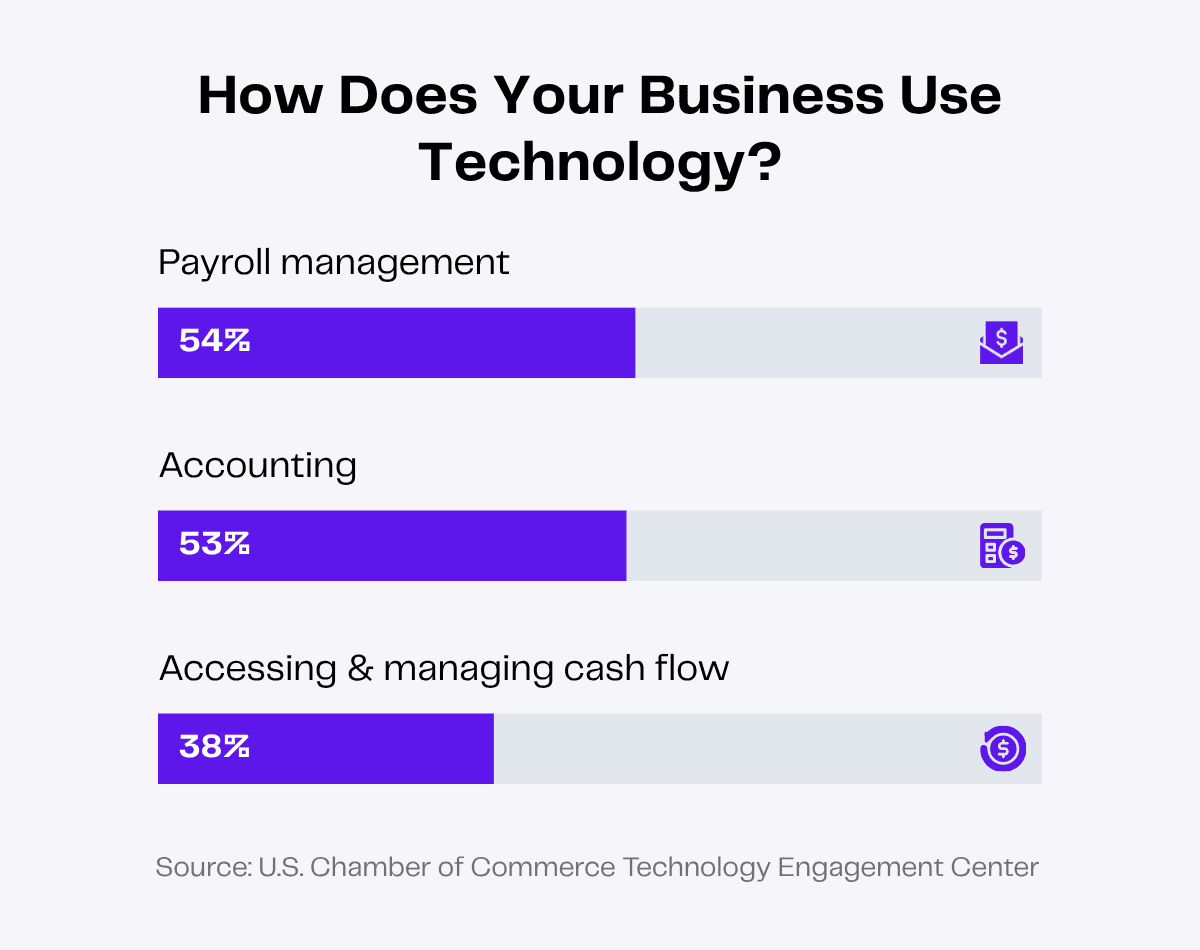
Businesses are already using tools to handle payroll management (54%), accounting (53%) and managing cash flow (38%).
Your virtual assistant will learn your way of bookkeeping and use QuickBooks software for different bookkeeping tasks.
The best thing is that VAs have specialized skills and you don’t have to micromanage them every step of the way. Once you train them to use the software, they’ll easily navigate it and organize your financial records.
Here are a few tasks you can delegate to your QuickBooks virtual assistants.
1. Set Up QuickBooks
Creating a new profile and adding all the financial information of your business can be extremely time-consuming.
Your virtual assistant will create an account for your business on QuickBooks. They will migrate data from tools like Excel to QuickBooks and get all the information on one platform.
2. Undertake Bookkeeping
Long gone are the days of manually tracking each transaction and worrying about accurate bookkeeping. In fact, with 68% of accountants reporting that their clients have needed more support with financial management in 2024, it’s clear that businesses are seeking smarter and more efficient solutions.

Your virtual assistant will connect your business’s bank accounts and credit cards with QuickBooks. The software will automatically import all transactions and record your expenses as per the custom rules you’ve set.
Your VA can also set up new custom rules to categorize your expenses, helping you analyze spending patterns, predict future costs and make data-driven decisions.
3. Store and Verify Data
The process automation market size is projected to reach USD 147.52 billion by 2030. This shows the growing importance businesses are placing on cutting-edge technology to reduce human errors and increase efficiency.
Processes like financial data entry can be easily automated using QuickBooks.
Your virtual assistant will use QuickBooks to store different data, including:
- Income and expenses
- Sales transactions
- Customer details
- Vendor information
- Inventory data
- Invoices and receipts
- Payroll data
This will ensure you have everything in one place so you can access data quickly. You can also ask your VA to verify all data for dual safety.
With QuickBooks, you don’t have to worry about breaches. Your data is password-protected and secure from unauthorized access.
4. Schedule Payments
Imagine consistently delaying payments to vendors who’ve always been reliable. What kind of reputation would that create for your business?
Making bill payments on time is crucial—delay them and you risk losing trusted vendors.
Using QuickBooks, your virtual assistants will track your bills and schedule timely payments.
They’ll pay all due bills on or before the due date to avoid late fees and help you maintain good relationships with your vendors.
They can also set up and automate recurring payments for rent, utilities, subscriptions and so on. This will eliminate the risk of missed due dates or service interruptions, keeping everything running smoothly.
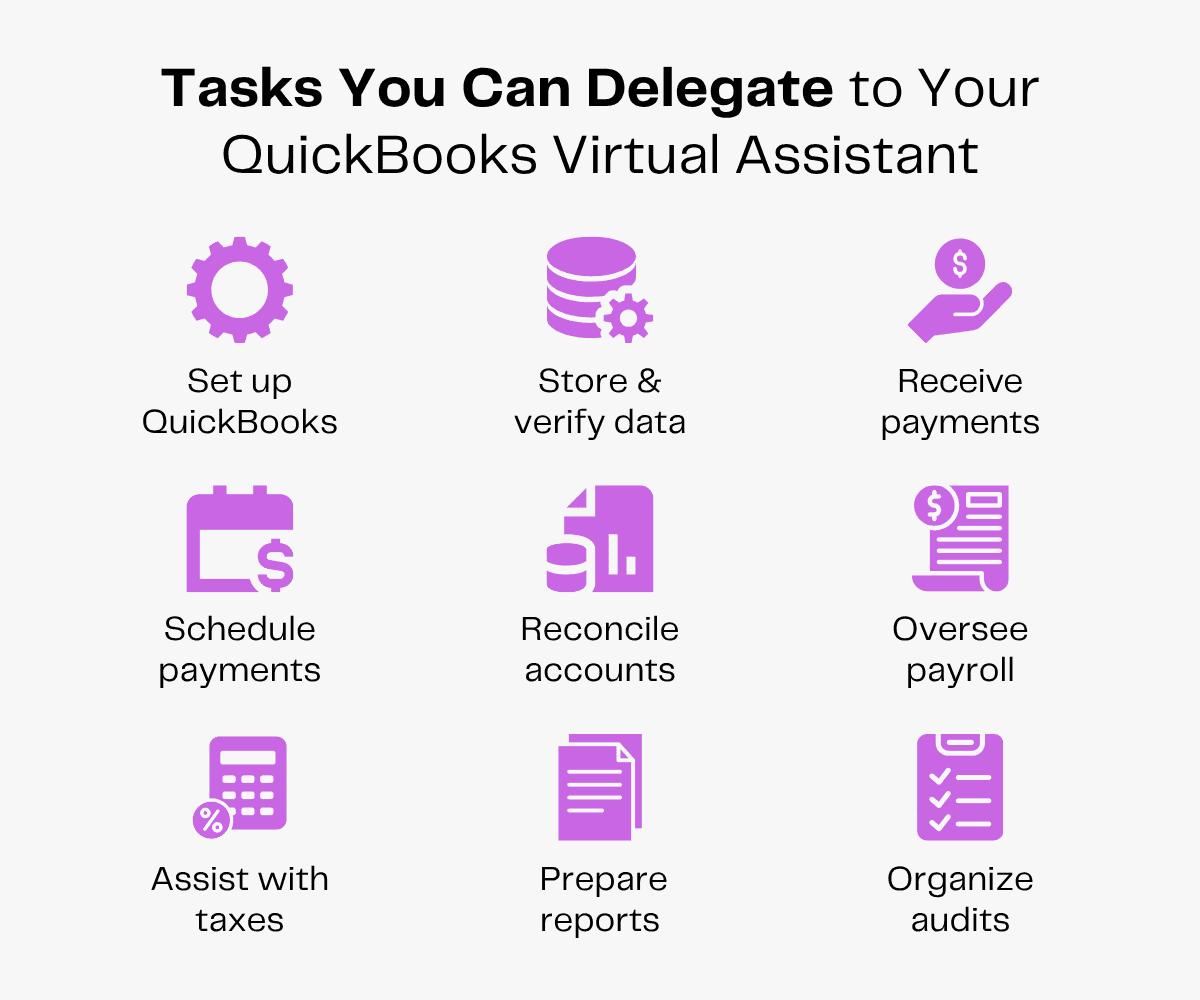
5. Receive Payments
Half of the US invoices issued in B2B trade in 2024 were overdue!
Late payments will restrict your cash flow and add a financial strain on your business. In fact, small businesses with outstanding invoices are owed more than $17,000 each on average.
Your virtual assistant will use QuickBooks to create and share invoices with your clients and set a clear payment schedule so you receive your payments on time. They can set up different payment modes for your clients to enhance convenience.
To follow up on overdue payments, your VA can also send polite reminders to clients.
6. Conduct Bank Reconciliation
Keeping track of the money going in and out of your business is a critical task for maintaining a stable business. Bank reconciliation helps you maintain accurate financial records, identify discrepancies and resolve them.
Virtual assistants will link your bank and credit card accounts with QuickBooks. They can use the “Reconcile” tab in QuickBooks to reconcile any business account easily.
With numerous transactions occurring each month, your VA will ensure that everything is thoroughly checked and updated.
7. Oversee Monthly Payrolls
In a survey, 87% of global decision-makers say the evolving complexity of payroll regulation is a big challenge. With a QuickBooks VA, payroll management is fast and convenient.
To simplify the payroll process, your virtual assistant can set up payroll on QuickBooks, track billable hours and pay salaries. The software can be used to calculate gross pay, deductions and taxes and maintain detailed records for audits.
Your VA will also update QuickBooks payroll with new employee information and tax withholdings.
8. Assist With Taxes
If your books are a mess, tax season will be a nightmare. You’ll be in a frantic crunch trying to clean them and file on time.
69% of small businesses in the US are confident they are paying taxes correctly with an accountant/bookkeeper. So using a bookkeeper helps you prepare better during tax season.
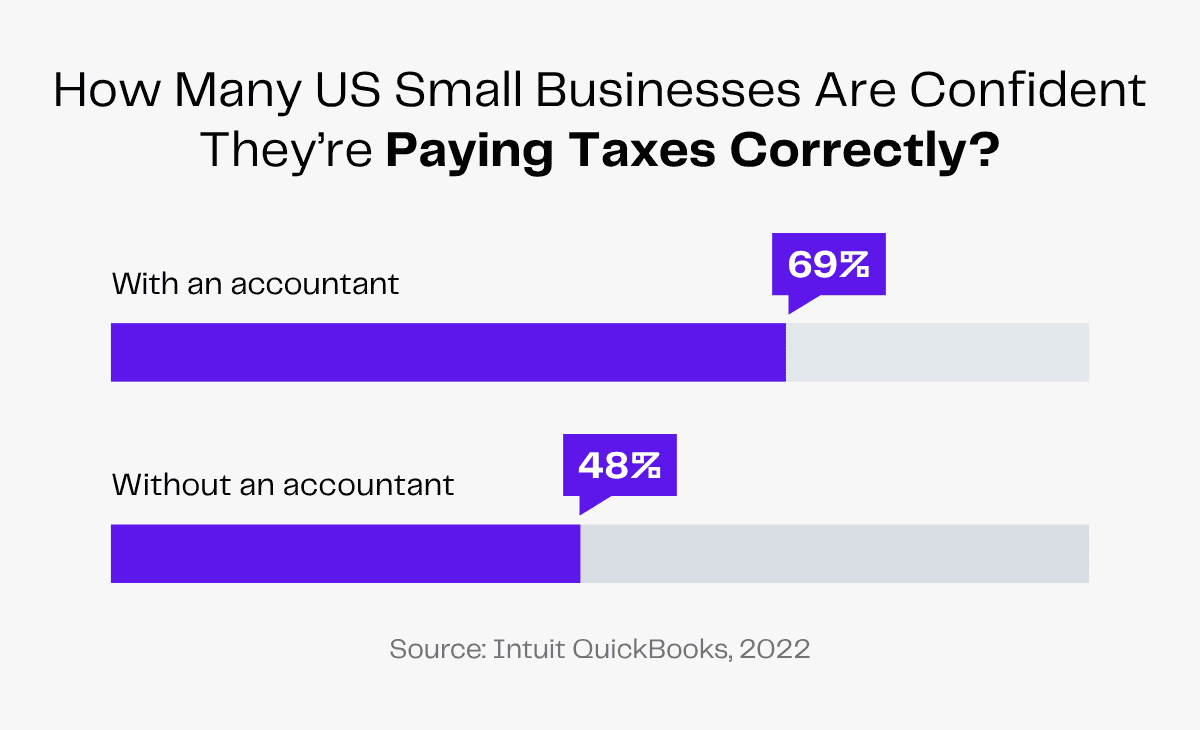
But these statistics also highlight that 31% are still underconfident despite having an accountant.
Using QuickBooks for bookkeeping, your VA will ensure all your financial transactions are organized and categorized accurately, minimizing human errors.
9. Prepare Financial Reports
21% of small businesses in the US can’t accurately predict costs or profit margins when creating estimates.
To understand your expenses, forecast costs and plan your budget, you need regular financial reports.
Your virtual assistant will use QuickBooks to generate balance sheets, profit and loss statements and cash flow statements. These reports will help you analyze your business’s financial health and make strategic decisions moving forward.
How Can I Hire a QuickBooks Virtual Assistant?
QuickBooks has made it a breeze to keep all your financial information in one place. But you do need someone who can manage the tool daily and use it to its full potential to support your business.
Different types of virtual assistants are skilled in specialized niches to serve various industries with their professional skills. Be it a large enterprise, a small business or an entrepreneur, having a bookkeeper who understands your industry can be a game-changer.
When you hire a skilled virtual bookkeeper, you do not just pay for their work but invest in making better financial decisions.
Before you wonder where you can find the most compatible VA for your business, you need to have clarity on the tasks you want to delegate.
Start by listing the bookkeeping tasks that will make your business run smoothly. Then, proceed to hire your choice of virtual assistant!
Take the Challenging Way
To hire a virtual assistant in this way, you will have to upload your ideal candidate’s job description on different job portals. After receiving responses from interested candidates, you will spend hours screening them.
The candidates who pass will have to be tested and interviewed. Once you spend hours filtering the candidates, you will finally hire someone who fits the criteria.
After a tedious onboarding marathon, you can only hope your hire actually delivers what they promise. If they don’t reach your expectations, you’ll have to repeat the entire costly, time-consuming and draining process.
Take the Easy Path
In a survey, 42% of respondents agreed that outsourcing gives them improved access to talent.
Smart business leaders who want to access global talent at an affordable cost should hire bookkeeping VAs from a virtual assistant company.

With agencies like Zenius, you save on overhead costs like office rent and electricity bills. You also don’t have to worry about paying statutory compliance, employment tax and other employee benefits.
Before hiring your VA, remember to ask meaningful questions during the interview and conduct assessment tests to evaluate them.
As you onboard your virtual assistant:
- Introduce them to your company culture.
- Conduct icebreaking sessions to ease the onboarding process.
- Give them access to the required accounts and online tools.
- Familiarize them with your style of work.
- Establish communication channels for smooth collaboration.
What’s New With QuickBooks in 2026?
QuickBooks has introduced many new features for processes like accounts receivable and payroll for your business. Your QuickBooks virtual assistant can stay updated with these changes and leverage them for increased efficiency.
Instead of chasing your clients, now your VA can use QuickBooks’ new feature to set up recurring payments to receive timely payments from your regular customers.
QuickBooks will directly charge the client on schedule, ensuring you get paid on time.
Your books will also update automatically with each recurring payment, saving up to 60% of the time you’d otherwise spend matching transactions.
QuickBooks is also introducing its “New Sale” feature, which your VA can leverage and set up for quick, transactional payments, eliminating the necessity of an invoice.
Apart from these features, now you can get more flexibility to assign employee compensation. When setting or editing an employee’s compensation, your VA can also add an hourly pay type for one or more payroll runs.
Wrapping Up
Manual bookkeeping is more prone to errors, while digital tools like QuickBooks make it easier to prevent mistakes.
So hiring a virtual assistant who can leverage QuickBooks to simplify bookkeeping is the right choice.
Storing and verifying financial data, scheduling timely payments, preparing regular reports and assisting with taxes—your QuickBooks VA will oversee the most time-consuming financial tasks.