
Key Takeaways:
The global IT services market size is projected to reach USD 3.3 trillion by 2033!
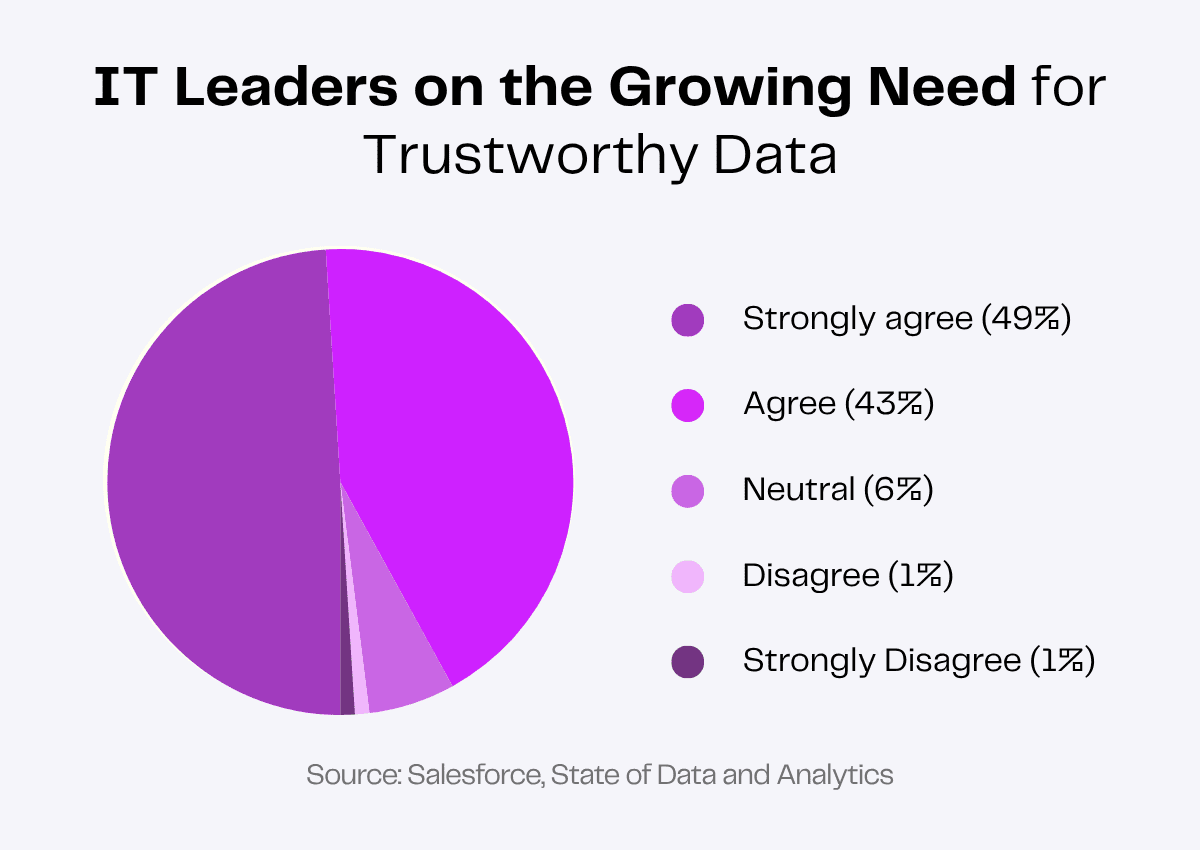
92% of IT decision-makers and analytics say that trustworthy data matters more than ever before.
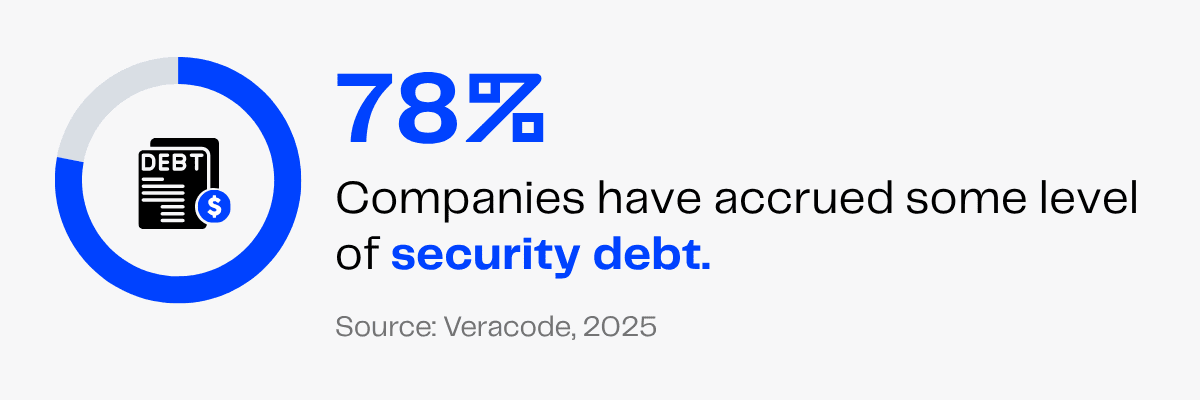
78% of organizations have accrued some level of security debt—highlighting the need for stronger cybersecurity practices and proactive risk management.
With global digital transformation spending expected to reach $3.88 trillion by 2028, businesses are embracing technology faster than ever.
But rapid growth also brings rising IT workloads, recurring technical issues and increased security vulnerabilities that can quickly slow operations and overwhelm your teams.
On top of this, imagine a customer experiencing delayed technical assistance because your teams were busy with other priorities. This can damage customer trust and your reputation.
And what about the growing risks of cyberattacks? All it takes is one mistake and your entire system is ready to collapse.
A virtual IT assistant helps prevent all these setbacks by providing timely technical support, resolving routine issues and keeping your digital operations running smoothly.
Virtual IT Support Services You Can Delegate
The global IT services market size is projected to reach USD 3.3 trillion by 2033!
This is driven by rapid digital transformation, cloud adoption, AI integration and the growing need for reliable technical and cybersecurity support.
As businesses continue investing in technology, they must manage IT operations and maintain systems effectively. This, in turn, has increased the need for virtual IT support services.
A virtual IT assistant is a tech-savvy, remote professional who handles day-to-day technical and cybersecurity operations.
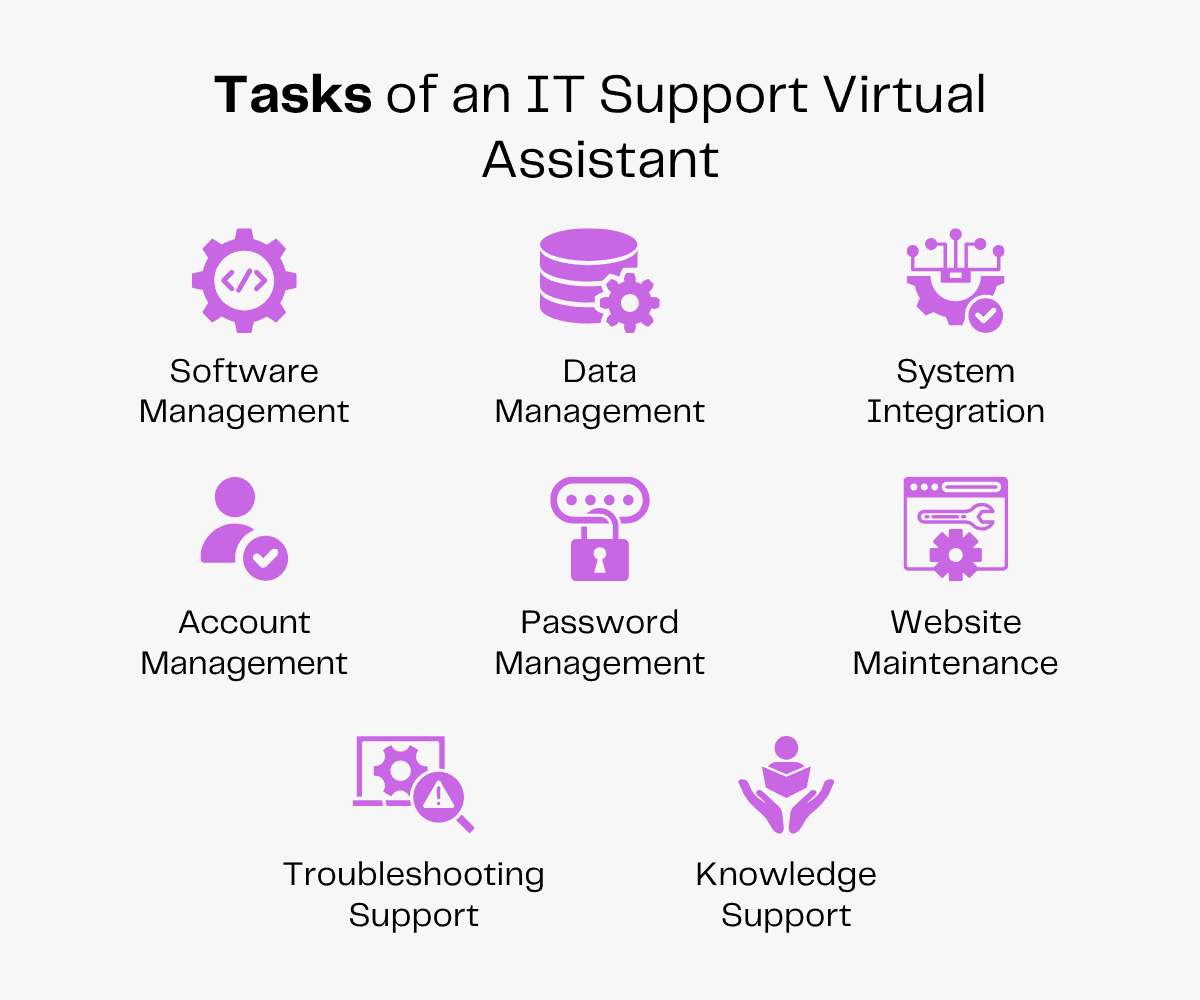
Here’s a list of the tasks they undertake to streamline your IT processes.
Data Management
92% of IT decision-makers and analytics say that trustworthy data matters more than ever before.
Every business decision, customer interaction and growth strategy depends on how accurate the data is, making it a strategic asset in today’s world.
But ensuring the right data is collected and organized becomes tedious as your customer base grows.
A virtual IT assistant can offer professional data management services. They can perform tasks like:
- Database organization: Organizing and maintaining digital databases.
- Data entry: Updating and validating business records regularly.
- Data cleaning: Removing duplicate, outdated, inaccurate or inconsistent data.
- Data integrity: Monitor data accuracy and consistency.
- Data migration: Import and export data between systems.
- Data backup: Perform regular backups and recovery checks for critical business data.
- Data security: Follow data privacy and security protocols.
A clean and organized database can improve efficiency, reduce errors and ensure your internal teams can access accurate information whenever they need it.
Software Management
Keeping business software updated and running efficiently is non-negotiable for productivity and security. As organizations rely on multiple applications for daily operations, managing software can quickly become a time-consuming responsibility for in-house teams.
An IT virtual assistant can streamline software management. CRM tools, CMS systems, document and file management software, project management dashboards, cloud storage, collaboration suites, payroll systems and so on—they’ll ensure all applications remain accessible and up-to-date.
This will reduce downtime, improve user experience and allow your employees to focus on high-value work without disruptions.
Your virtual IT assistant will:
- Install and configure software.
- Manage software updates and patches.
- Monitor software licenses and renewal.
- Assist with application setup for new employees.
- Remove unused or outdated software.
- Troubleshoot basic software issues such as audio glitches, screen freezes or update failures.
- Share and maintain software user guides.
56% of firms have already adopted artificial intelligence at work. With new software, AI tools and digital solutions entering the market every day, you need to update your tech stack to stay competitive.
An IT virtual assistant can keep track of emerging technologies, evaluate tools that align with your business needs and recommend solutions to improve your workflow.
System Integration
Imagine your team’s productivity slowing down because data is scattered across disparate platforms instead of flowing seamlessly!
When systems are disconnected, data becomes fragmented, workflows slow down and employees spend valuable time switching between platforms.
An IT virtual assistant supports system integration by assisting with coordination, monitoring and maintenance of connected business applications.
They will link separate software and data modules into a unified infrastructure. They’ll also configure application connections, monitor data synchronization, test integrated workflows, fix basic integration issues and update them when required.
This will help improve data flow, reduce manual work and create more efficient day-to-day workflows.
Password and Account Management
A report on the State of Software Security shows that 78% of organizations have accrued some level of security debt. This refers to unresolved security flaws, vulnerabilities and misconfigurations.
The longer the delay in fixing these issues, the higher the risk of a cyberattack, a data breach or regulatory compliance failure.
Want to prevent domino breaches, block phishing attacks and improve overall security?
Your virtual IT assistant helps keep account access organized by managing user credentials, creating and updating employee accounts and ensuring the right people have the right level of access to internal systems.
They will:
- Set up user accounts.
- Update user profiles and account information.
- Use password managers to safeguard sensitive data.
- Manage user roles and permissions.
- Enable multi-factor authentication.
- Reset passwords and unlock accounts.
- Resolve login issues.
- Deactivate accounts for past employees.
Website Maintenance
Your website is often the first impression customers have of your business.
Broken links, unoptimized media, slow loading speeds or screen incompatibility can hurt user experience, reduce credibility and even impact search engine rankings—all bad news for any business.
A technical virtual assistant can keep your website secure, functional and up-to-date by handling routine maintenance tasks, monitoring performance and coordinating technical updates.
They can:
- Install, update and monitor plugins and themes.
- Manage content management system updates.
- Identify and fix broken links.
- Upload and organize the website media library.
- Perform and verify regular website backups.
- Check website speed and uptime.
- Identify and report bugs and errors.
- Monitor website security.
Knowledge Support
As businesses introduce new products, software and services, keeping both employees and customers informed becomes essential.
An IT help desk virtual assistant will offer consistent and helpful knowledge support to both your internal teams and customers.
They can:
- Create and update product manuals and user guides.
- Simplify technical jargon and complex procedures.
- Document new features and software releases.
- Maintain internal and customer knowledge bases.
- Develop and update FAQs.
- Document workflows and SOPs.
- Create troubleshooting articles.
- Prepare software training resources.
Clear documentation and accurate product information will reduce confusion, improve user experience and help support teams resolve queries efficiently.
Troubleshooting Support
If you own an IT and software business, customer troubleshooting requests are an inevitable part of delivering technology solutions.
These technical issues could include login problems, software bugs, network disconnections, device failures or general usability roadblocks.
Prompt issue resolution will not only help minimize downtime but also ensure your customers have a satisfying user experience.
An IT help desk VA can provide first-level troubleshooting support for both employees and customers, guiding them through the fixes.
They will:
- Assist customers with basic product and technical queries.
- Identify and walk users through step-by-step troubleshooting.
- Update troubleshooting FAQs and guides.
- Log, track and update support requests.
- Forward complex issues to the appropriate technical team.
- Record issues, solutions and recurring problems for reference.
What Are the Benefits of Hiring an IT Virtual Assistant?
Whether it’s the cost-saving benefit, productivity perks or niche-specific assistance, a virtual assistant is advantageous to your business in many ways.
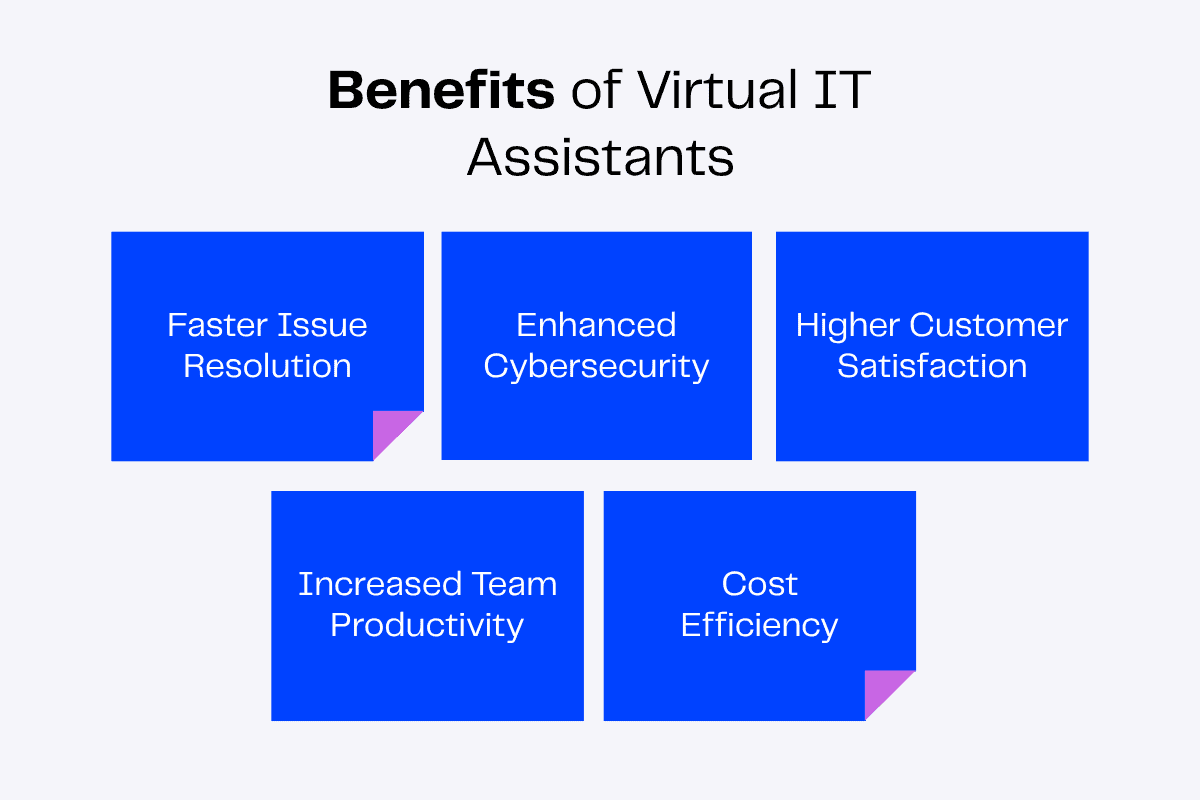
Here’s a list of benefits you can enjoy if you opt for virtual IT services.
Faster Issue Resolution
Speed is what you need to stay ahead of the curve. But technical errors and glitches can come in the way.
These issues slow down operations, frustrate employees and impact customer satisfaction if they aren’t addressed promptly.
Whether it’s connectivity problems, account access issues, network glitches or website server errors, a virtual IT assistant can quickly identify and resolve them.
They’ll provide first-level support, troubleshoot common problems and escalate complex issues when necessary, ensuring faster resolutions and minimizing business disruptions.
Enhanced Cybersecurity
Every workplace concerned about sensitive data needs a digital security strategy in place.
An important turning point in the development of cybersecurity is the increasing incorporation of AI into every layer of the digital ecosystem.
Chuck Brooks, Thought Leader & Subject Matter Expert in Cybersecurity and Emerging Technologies
AI is a ubiquitous operational force that is simultaneously bolstering defensive capabilities and enabling attackers with previously unheard-of speed, precision and autonomy.
… a proactive, anticipatory and flexible security posture based on ongoing intelligence and systemic resilience is necessary due to the speed and complexity of AI-enabled threats.
A virtual IT assistant can enhance your digital security using different methods and tools to safeguard it from potential threats.
Some of the methods include enabling additional steps in authentication, regularly monitoring accounts and systems, changing weak passwords, creating backups and updating software on time.
A secure digital ecosystem means you protect sensitive business data from unauthorized access, ensure data-related compliance and prevent heavy financial losses.
Higher Customer Satisfaction
Imagine a customer reaches out with a technical problem but has to wait hours—or even days—for your response. Delayed support means frustrated customers, reduced trust and lost business.
An IT help desk virtual assistant provides prompt first-level customer support by answering product queries, guiding users through basic troubleshooting and resolving common issues.
This will ensure customers receive timely assistance and a smooth support experience, strengthening customer trust and satisfaction!
Increased Team Productivity
If your internal teams are spending hours every day resetting passwords, updating software or answering routine technical questions.
These repetitive tasks can distract your team from its core tasks and reduce overall efficiency.
A technical VA takes care of day-to-day IT operations and customer support, freeing your in-house team to focus on complex problem-solving and innovation.
Your VA can also recommend tools that automate tasks, streamline workflows and reduce manual effort.
Team productivity is how you meet more objectives!
Reduced Costs
Cost-efficient support is a practical strategy for financial health and long-term business growth. And that’s one of the best benefits of hiring a virtual assistant.
They cost less than hiring an in-house professional. You save on overhead costs as you don’t have to provide office space, utilities, equipment, internet connection or employee benefits to your VA.
Also, if you hire offshore virtual assistants from agencies like Zenius, you save more money!
An IT virtual assistant, especially, prevents costly downtime and security oversights before they escalate into expensive problems.
The Impact of Hiring an IT Virtual Assistant
Here’s a quick overview of everything an IT virtual assistant does, the immediate benefits and the long-term impact on your business.
| Task | Benefit | Impact |
|---|---|---|
| Data management | Accurate, clean data | Better decision-making |
| Software management | Less disruptions | Higher productivity |
| System integration | Connected business tools | Streamlined workflows |
| Password support | Secure user access | Robust security |
| Website maintenance | Fewer technical glitches | Better user experience |
| Knowledge support | Updated documentation | Consistent information |
| Troubleshooting | Quick problem resolution | Higher customer satisfaction |
What Are the Skills of a Good IT Virtual Assistant?
A good virtual assistant brings several skills that are in demand in your industry.
If you need reliable virtual IT solutions for your business, here’s what you should look for in your VA.
Attention to Detail
Sometimes a tiny error can be the root cause behind a large disruption.
That’s why you need a virtual IT assistant with excellent attention to detail.
This skill will enable them to consistently identify errors and spot opportunities for improvement across your digital tools, work processes and more.
Analytical Skills
Analytical skills are necessary for critical judgment, pattern recognition and data interpretation.
A virtual IT assistant with this particular skill can be a great asset to your organization. With this skill, they can find out how to use data and information to make their workplace more efficient.
The VA will become reliable as they can resolve troubleshooting errors, organize information and recommend new tools.
Technical Skills
As per employer expectations, technological skills are set to grow in importance faster than any other skill category by 2030.
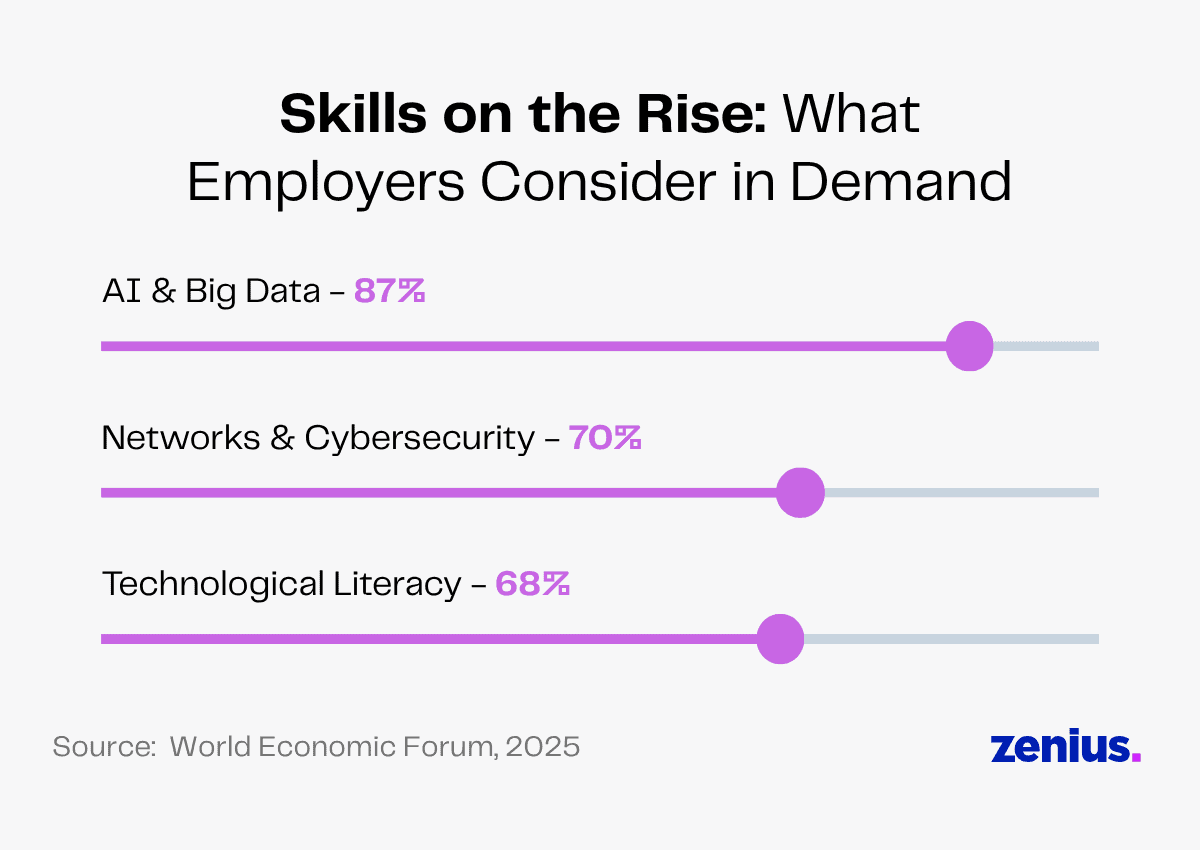
Technical skills are core to an IT virtual assistant’s success. These skills enable them to confidently work with software, cloud platforms, operating systems and digital collaboration tools.
A tech-savvy VA also keeps track of the latest tools and technologies, adapts to changing systems easily and follows best security practices, creating a tech-driven workspace.
Communication Skills
Strong communication skills will enable your VA to explain technical jargon in user-friendly language, respond professionally to concerns, prevent misunderstandings and improve overall support experience.
Timely updates, well-drafted FAQs and guides and accurate documentation will also ensure everyone stays informed.
Read More: Good Qualities of Great Virtual Assistants
How To Work With a Virtual IT Assistant
Successful collaboration starts with a smooth onboarding process that sets clear expectations from day one!
Follow these steps to work with your VA and ensure they become a reliable extension of your team.
Set Clear Tasks
Setting clear tasks will give your virtual IT assistant a better picture of what needs to be done. This is essential to eliminate confusion and ensure tasks are completed efficiently.
Assign every task with clarity in your mind. Give them all the details such as priorities, expected outcomes and deadlines.
You can encourage your VA to openly discuss unclear tasks to keep every objective crystal-clear.
Track Performance
Measure your VA’s performance using key performance indicators (KPIs) such as response time, issue resolution rate, system uptime and task completion.
Regular performance reviews will help identify strengths, address challenges and optimize workflows to maximize your VA’s value.
Share Feedback
You must help your virtual IT assistant take their abilities and skills to a new level.
Provide timely, constructive feedback to help your VA improve and stay aligned with your business goals. Keep a healthy balance between appreciating achievements and suggesting improvement to foster stronger collaboration.
FAQs
What are the 5 C’s of cybersecurity?
The 5 C’s of cybersecurity include Change, Compliance, Cost, Continuity and Coverage. These guide you in keeping your tech-stack updated, following industry regulations, minimizing the financial impact of cyber risks, implementing disaster recovery and securing all potential attack surfaces.
How do virtual IT support services compare in cost to on-site IT support?
The average salary of an IT support professional is $69,860/year. With virtual assistants, you save on the expenses of hiring full-time staff, overhead costs and employee benefits.
What common challenges arise when transitioning to virtual IT solutions and how can they be resolved?
Transitioning to virtual IT solutions can come with challenges such as communication gaps, unclear workflows and security concerns. These can be overcome through establishing clear expectations, defining procedures and signing confidentiality agreements.
How can businesses measure the ROI and effectiveness of deploying a virtual IT assistant?
Measure your VA’s ROI and effectiveness by tracking IT support costs, support ticket backlog, issue resolution time, system uptime and security-related issues.
Wrapping Up
Technology should drive your business forward, not hold it back. And that’s only possible when you use industry-standard tools, prevent data silos, resolve system downtime and protect your tech environment from threats.
An IT virtual assistant resolves issues before they become disruptions, supports users and keeps your tech-stack running efficiently.
From data management and system integration to website maintenance and customer service, they handle all tech-related tasks seamlessly.
Take the first step toward smarter IT support.